Aadhaar Card Download 2026: How to Get e-Aadhaar Online from UIDAI
Aadhaar Card Download helps Indian residents get access to Aadhaar online in a digital format, called e-Aadhaar. It is issued by UIDAI, the unique identification authority of India. The file is secure, password-protected, and comes as a PDF. It is legally valid for identity proof and address proof. Many users prefer this method because the download is fast and simple. Use the Aadhaar Number, Enrollment ID, or Virtual ID on the official website or the mAadhaar app. This service works anytime and anywhere.
The Aadhaar card is a 12-digit unique ID from the Indian government. This article clearly outlines the steps that are essential for identity verification and accessing services. The unique identification number is provided by the Government of India to all citizens through one central portal. It acts as universal proof. In 2026, Aadhaar services became more beneficial and comfortable. The secure online options make downloading, updating, and verifying details very easy.
What is e-Aadhaar? Simple Explanation
The e-Aadhaar is the electronic version of the Aadhaar Card. It is issued by UIDAI (Unique Identification Authority of India). It comes as a digitally signed PDF document.
Key points explained clearly:
- It contains all Aadhaar details like name, date of birth, gender, address, and Aadhaar number
- It is equally valid as the physical Aadhaar card
- It is accepted for identity verification and address verification
- It works for government services and private services
- It is legally valid under the Aadhaar Act 2016
- It is accepted across India as proof of identity and proof of address
Security and privacy features:
- The file is password protected
- It can be downloaded online anytime
- Available on the official UIDAI website and on the mAadhaar app
- Users can choose Masked Aadhaar, where only the last four digits are visible
- The full 12-digit Aadhaar number stays hidden for enhanced privacy
Types of e-Aadhaar:
- Regular Aadhaar: shows the full 12-digit number
- Masked Aadhaar: hides the number except for the last four digits
PDF password details:
- The PDF file opens with a password
- Password uses:
- The first four letters of the name in uppercase
- Birth year in YYYY format
- Example:
- Name: Priyaa
- Year: 1991
- Password: PRIY1991
Prerequisites Before Downloading Aadhaar
These prerequisites must be ready before downloading Aadhaar.
Required details:
- Aadhaar Number (UID)
- Enrolment ID (EID)
- 28-digit EID
- Includes 14-digit enrolment number + 14-digit timestamp
- Virtual ID (VID)
- 16-digit VID also works
Technical requirements:
Important note:
- If the mobile number is not registered, visit the Aadhar Seva Kendra (ASK)
- Staff provides proper assistance for updates and downloads in myaadhaar.se/aadhar-card-download
This order streamlines the process, making it clear, safe, and easy for every user.
Easy Methods to Download Aadhaar Card Online 2026
You can download your Aadhaar card using multiple methods. Below, we have provided step-by-step instructions for obtaining your e-Aadhaar securely from official platforms, including the UIDAI website, the mAadhaar app, and offline options.
1. Download e-Aadhaar Using the UIDAI Website
The UIDAI Website is the simplest way to download e-Aadhaar. This method is fast and works on any device with internet access. Follow these steps carefully:
- Visit the website myaadhar.uidai.gov.in and download the Aadhaar card on your browser.
- Select Option: Click on Download Aadhaar in the My Aadhaar section.
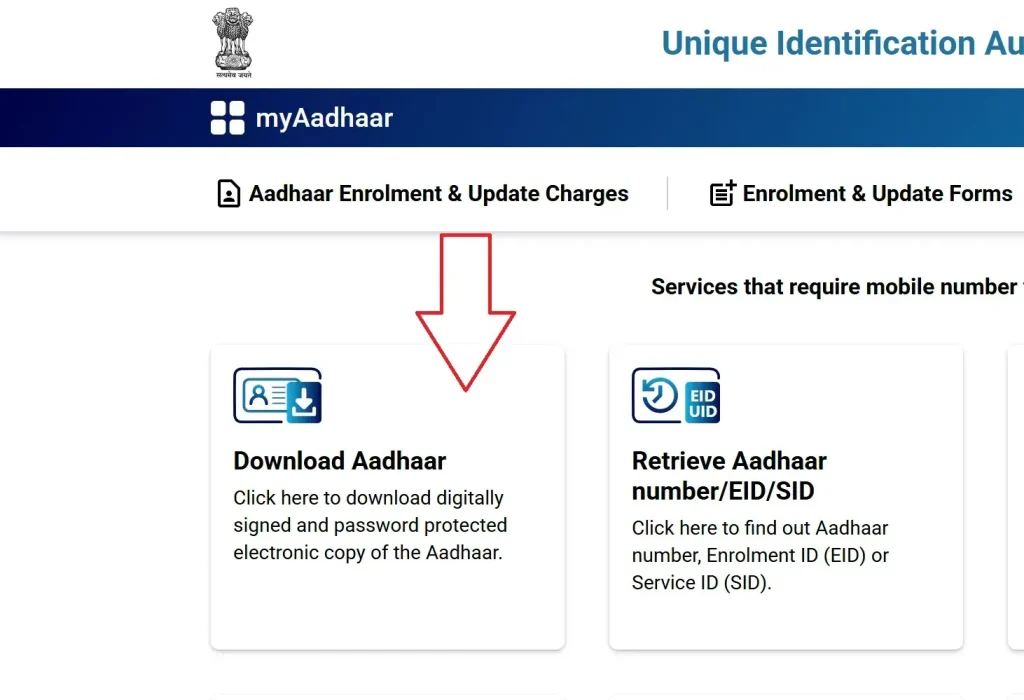
- Choose Identifier: Use your Aadhaar Number (12-digit Aadhaar number), Enrolment ID (28-digit EID), or Virtual ID (16-digit VID).
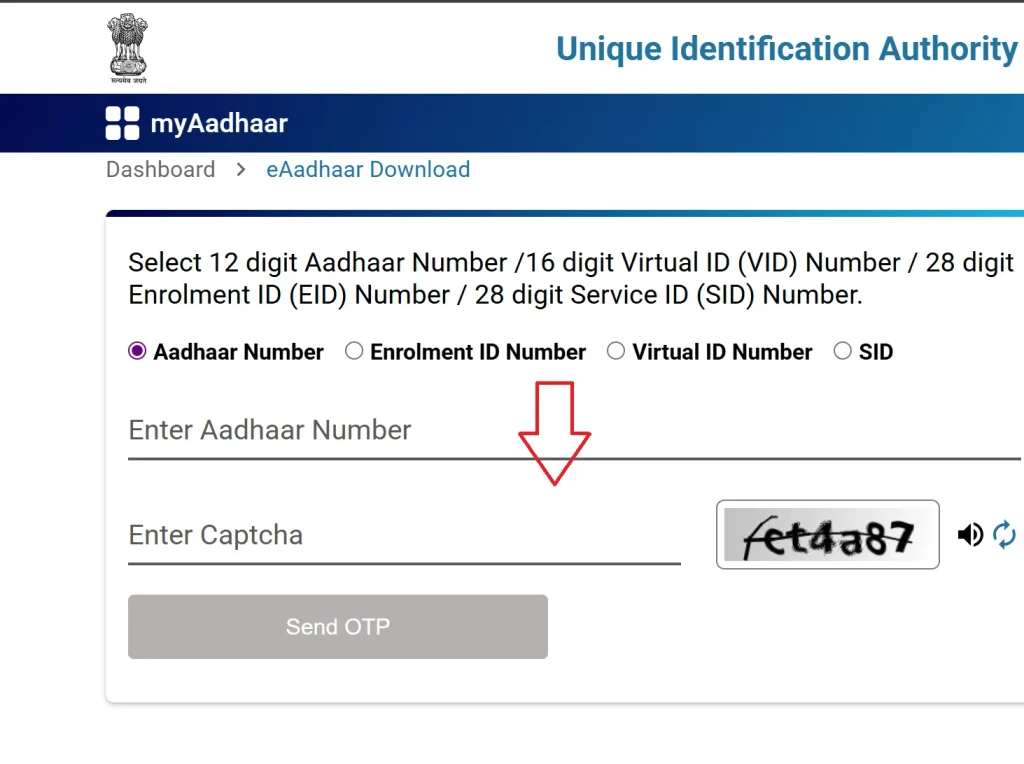
- Enter Captcha: Type the security code shown on the screen.
- Request OTP: Click Send OTP. The one-time password will come to your registered mobile number.
- Select Aadhaar Type: Choose Regular Aadhaar or Masked Aadhaar for privacy.
- Verify and Download: Enter the OTP and click Verify and Download. The e-Aadhaar PDF will be saved on your device.
- Open PDF: Use a PDF reader and enter the Aadhaar password. The password uses the first four letters of your name in uppercase plus your birth year (e.g., AMST1994).
2. Using mAadhaar App to Download Aadhaar
The mAadhaar app is developed by UIDAI for smartphones. It is available on the Google Play Store (Android) and the App Store (iOS). This app allows you to manage Aadhaar digitally and download your card easily.
- Install App: Download the Aadhaar card app.
- Select Language: Pick the language you understand.
- Log In: Enter your registered mobile number and receive OTP.
- Access Dashboard: Open the app dashboard and select Download Aadhaar under Get Aadhaar.
- Enter Details: Provide Aadhaar Number, EID, or VID, and the captcha code.
- Request OTP/TOTP: Use the OTP or TOTP feature if enabled.
- Verify and Download: After verification, your e-Aadhaar PDF will save on your device.
- Open PDF: Use the standard Aadhaar password (first four letters + birth year).
- Additional Features: Lock/unlock biometrics, verify Aadhaar, order PVC Aadhaar Card, and limited Aadhaar Card address change.
3. Download the App via DigiLocker
DigiLocker is a cloud-based platform integrated with UIDAI. It stores digital documents safely and allows you download e-Aadhaar anytime.
- Sign In: Visit digilocker.gov.in or download the DigiLocker app.
- Find UIDAI: In the search bar, type UIDAI and select Aadhaar.
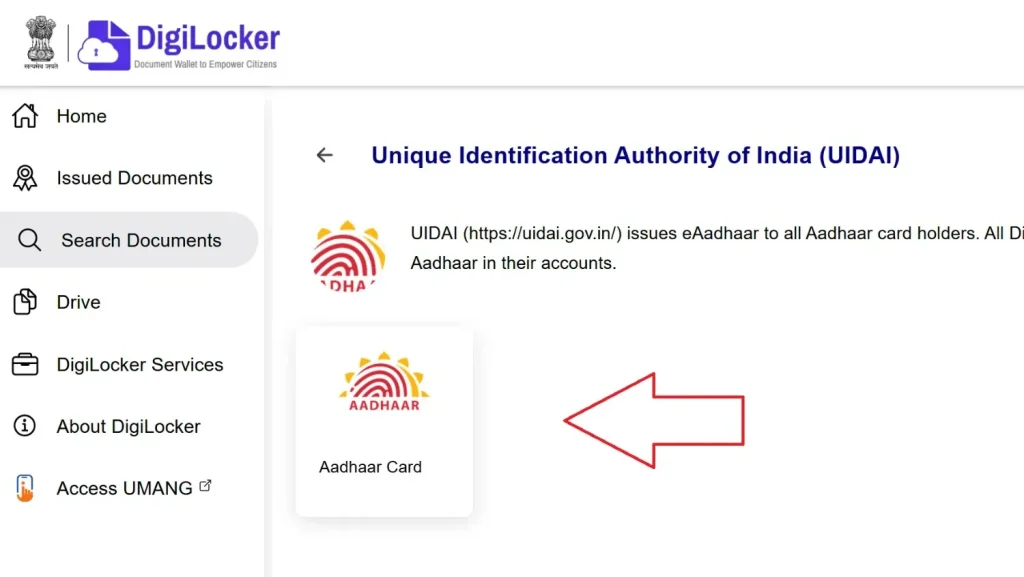
- Enter Aadhaar Number: Type your 12-digit Aadhaar number and verify with OTP.
- Download Aadhaar: Your card will appear under Issued Documents. Click the download icon to save e-Aadhaar PDF.

- Open PDF: Use your Aadhaar password (first four letters of your name in CAPITAL letters + birth year).
4. How to Download Using Name and Date of Birth
If you forget your Aadhaar number or EID, you can still download e-Aadhaar using your name and date of birth.
- Visit the UIDAI Website: Go to myaadhar.uidai.gov.in and download the Aadhaar card.
- Select Retrieve Option: Click Retrieve EID/Aadhaar Number.
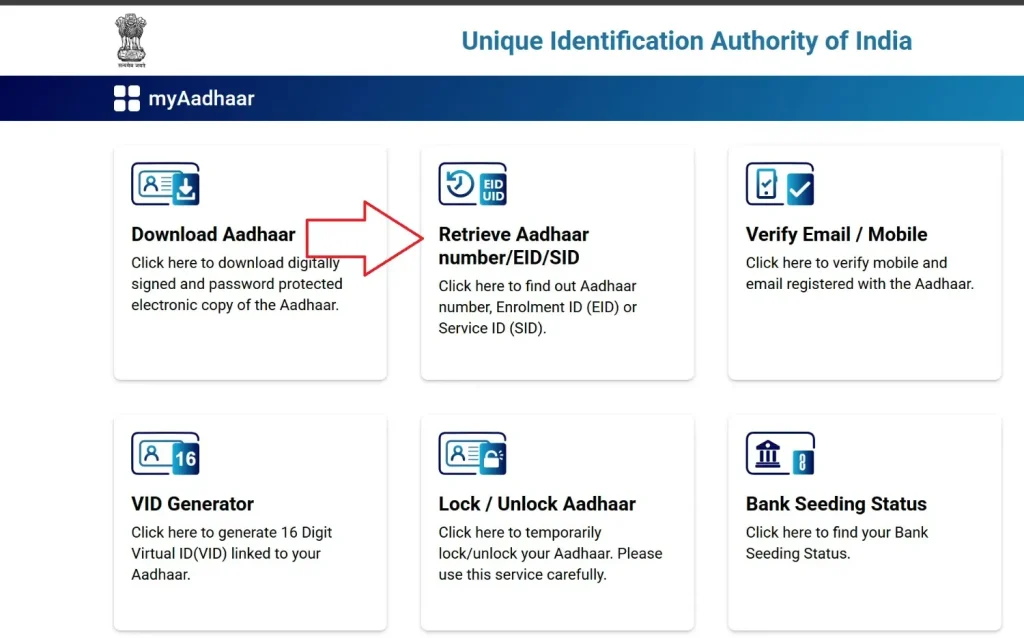
- Enter Details: Fill in your full name, registered mobile number or email, and date of birth.
- Complete Captcha: Enter the security code and click Send OTP.
- Verify OTP: Receive OTP on your mobile or email.
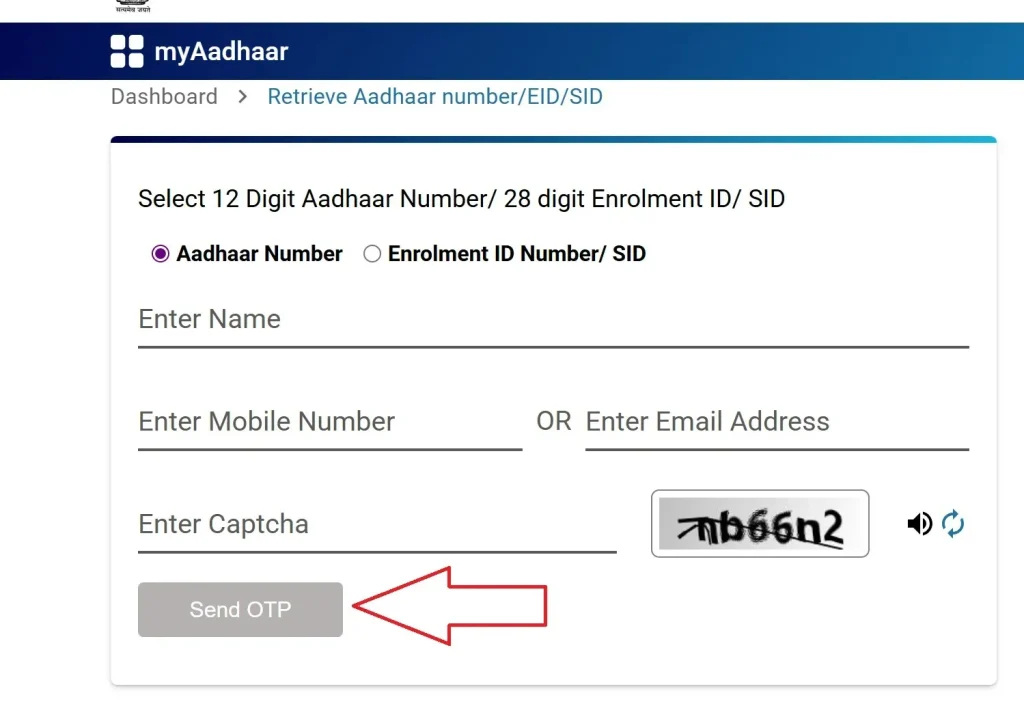
- Download e-Aadhaar: Use the retrieved Aadhaar Number or EID and follow the normal steps to download the e-Aadhaar PDF.
5. Download e- Aadhaar Without a Registered Mobile Number
If your mobile is not linked with Aadhaar, visit an Aadhaar Seva Kendra (ASK) to download your card.
- Locate Center: Find the nearest Aadhaar Seva Kendra using the website or the mAadhaar app.
- Biometric Verification: Submit fingerprints or an iris scan.
- Carry Identity Proof: Bring a PAN card, voter ID, or other identity proof.
- Request Print: You can get a download print for Rs. 30 (normal color) or a PVC Aadhaar Card for Rs. 50.
6. Download via UMANG App
The UMANG App (Unified Mobile Application for New-age Governance) also allows Aadhaar download.
- Open App: Available on Android and iOS.
- Visit: https://web.umang.gov.in/
- Log In/Register: Enter mobile number and verify OTP.
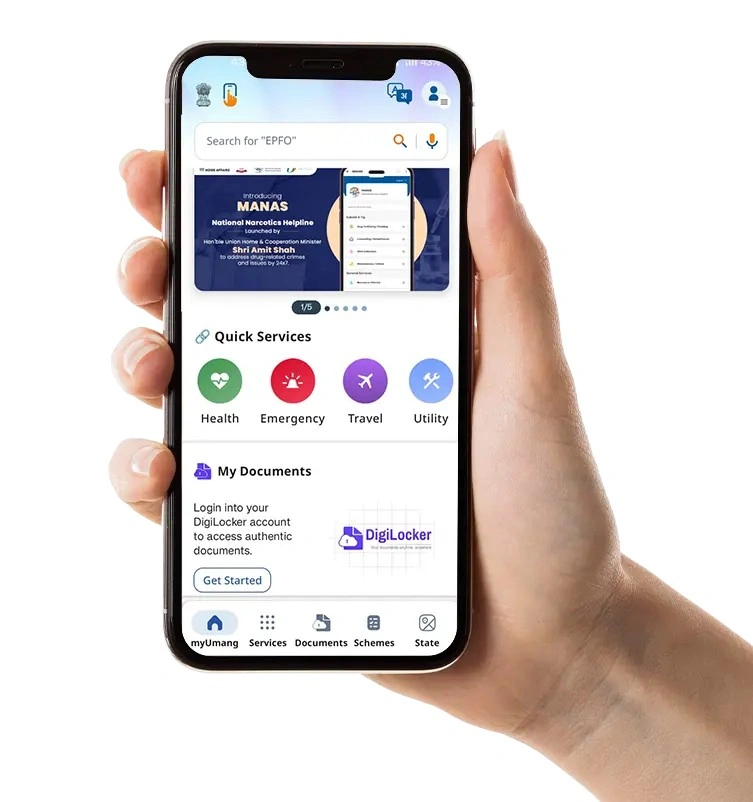
- Search Aadhaar Service: Choose Download Aadhaar.
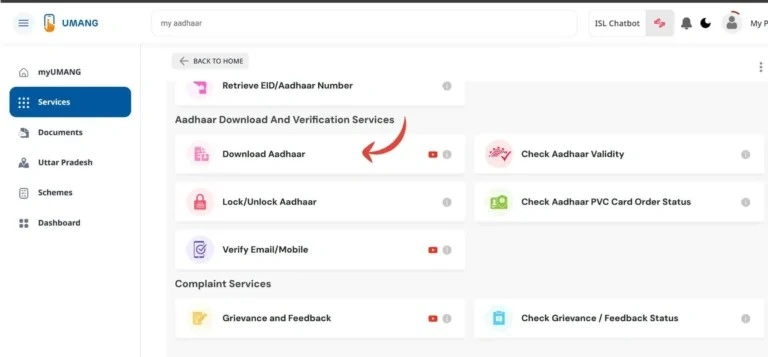
- Enter Details: Input Aadhaar Number, EID, and OTP verification.
- Download e-Aadhaar PDF: Follow the app steps to download e-Aadhaar.
Documents Required for Aadhaar Update
How to Print Your e-Aadhaar Card
Once the e-Aadhaar PDF is downloaded, it can be printed for physical use. The process is quick and ensures your Aadhaar card looks official one. Many people prefer keeping both the printed e-Aadhaar and the digital version for convenience.
- Start by opening the PDF using a PDF reader like Adobe Acrobat or Microsoft Edge.
- These readers make it easy to view and print your file without errors.
- Before viewing, enter the password to unlock the document.
- Input the password carefully using this format:
- The first four letters of your name in uppercase, followed by your birth year.
- Example: For Rahul, born in 1995, your password will be RAHU1995.
- Input the password carefully using this format:
- Tap on Select Print and choose the number of copies you need.
- Then simply click Print.
- Your printed e-Aadhaar is fully valid, just like the physical card you receive from UIDAI.
- Remember, the e-Aadhaar card password is an 8-character combination of the cardholder’s name (exactly as written on the Aadhaar card) in uppercase, followed by the birth year in YYYY format.
- To make it even clearer, here are some examples:
- Name: Sameer Sarkar, Birth Year: 1995 → Password: SAME1995
- Name: Raj Vikram, Birth Year: 1982 → Password: RAJV1982
- Name: Raj Shankar, Birth Year: 1991 → Password: RAJS1991
- Name: S.M. Kunar, Birth Year: 1986 → Password: S.M.1986
- Name: Sam, Birth Year: 1979 → Password: SAM1979
Having your printed e-Aadhaar gives peace of mind in case your digital copy is not accessible. The format and layout stay official, making it ideal for authentication or everyday use.
What is a Masked Aadhaar Card?
The Masked Aadhaar card is a secure version of the e-Aadhaar. It shows only the last four digits of your 12-digit Aadhaar number to protect privacy. This makes it safe to use while keeping its legal identity and address verification valid anywhere in India.
- The Masked Aadhaar is issued by the Unique Identification Authority of India (UIDAI).
- It is ideal for sharing in situations like KYC, rentals, or other verifications.
- Using the Masked Aadhaar ensures your full Aadhaar number is never exposed.
- This keeps your sensitive data safe while allowing official checks.
- It is perfect for people who want to carry proof of identity and address without revealing all details.
- Works in banks, telecom, rentals, or any scenario requiring Aadhaar verification.
- The Masked Aadhaar card combines security, privacy, and official validity in a simple, convenient format
Important Features of Masked Aadhaar Card
Definition
- A digital e-Aadhaar PDF is available that helps protect your personal details.
- It masks the first eight digits of your 12-digit Aadhaar number, showing only the last four digits like XXXX XXXX 1234.
- This feature keeps your number safe when you share your Aadhaar for different uses.
Purpose
- The main goal is to enhance privacy and reduce the risk of misuse.
- When sharing Aadhaar for verifications in banking, telecom, rentals, or employment, this version keeps sensitive data hidden.
- It helps people feel more secure while sharing their Aadhaar digitally or physically.
Validity
- The Masked Aadhaar is legally equivalent to the regular e-Aadhaar and the physical Aadhaar card.
- It is recognized under the Aadhaar Act 2016.
- You can use it for both government and private services that need identity or address proof.
- It carries the same trust level as your full Aadhaar document.
Content
- It includes demographic details like your name, address, date of birth, and gender.
- A photograph and a QR code are also added for offline verification.
- The masked Aadhaar number appears clearly. While biometric data such as fingerprints and iris scans are not shown in the PDF.
- This keeps sensitive data secure yet makes the card functional for verification.
Availability
- You can download it for free from the UIDAI official platforms.
- There is no cost involved compared to the regular e-Aadhaar.
- It’s simple, quick, and available anytime online for your convenience.
Download Masked Aadhaar Card from myAadhaar Portal
The myAadhaar portal is UIDAI’s official online platform for all Aadhaar services. It provides a secure, user-friendly interface to download your Masked Aadhaar quickly. Following the correct steps ensures your Aadhaar is safely accessed.
- Visit My Aadhaar Portal using a browser at https://myaadhaar.uidai.gov.in/.
- This is the official entry point for all Aadhaar downloads.
- On the homepage, Select Download Aadhaar under My Aadhaar services
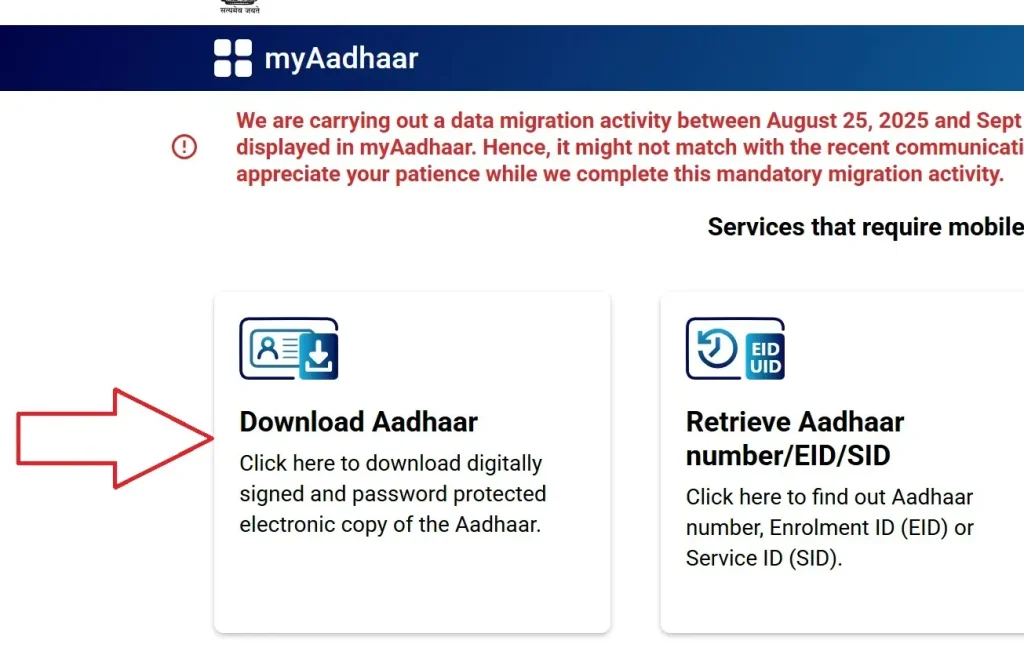
- Enter Details carefully, including your 12-digit Aadhaar number or 16-digit Virtual ID.
- Fill in the captcha code displayed on the page.
- Choose Masked Aadhaar if you want to hide the first eight digits.
- This ensures only the last four digits of your Aadhaar number are visible.
- Request OTP by clicking Send OTP.
- The one-time password will be sent to your registered mobile number.
- Verify OTP by entering the OTP received via SMS.
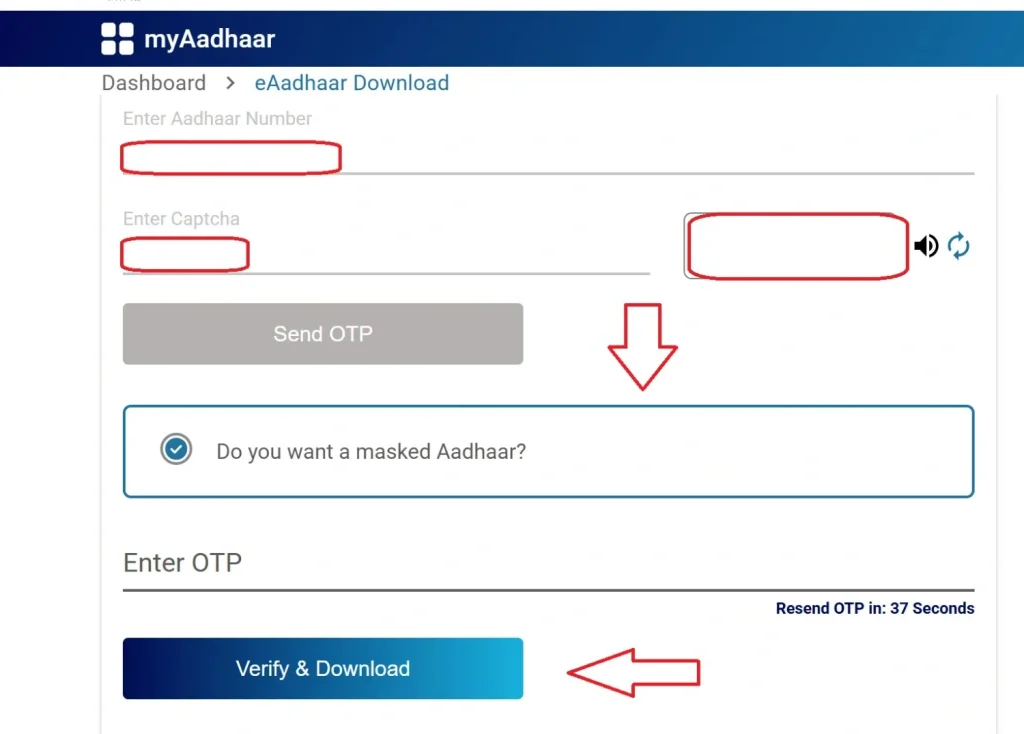
This confirms your identity before downloading the Aadhaar.
- Download the file by clicking Verify & Download.
- The e-Aadhaar PDF is password-protected for security.
- Open PDF using the password format: first four letters of your name in uppercase + birth year.
- Example: RAHU1999 for Rahul born in 1999.
- Note: Your mobile number must be registered with UIDAI.
- If not, visit an Aadhaar Enrolment Centre to update it.
- For any queries, contact UIDAI at 1947 or visit an Aadhaar Seva Kendra.
- The portal supports multiple languages, including Hindi, English, Telugu, Kannada, Tamil, and others.
Easy Methods to Download Aadhaar Card Online 2026
Most Aadhaar services are completely free when done online using the UIDAI website, mAadhaar app, or DigiLocker. However, certain services provided at Aadhaar Seva Kendras (ASKs) or enrollment centres may have nominal fees for processing.
Aadhaar Service Charges Table
| Service | Cost | Notes |
|---|---|---|
| Download e-Aadhaar Online | Free | Available through UIDAI website or mAadhaar app |
| Printed Aadhaar from Centre | Rs. 30 | Requires biometric verification at the centre |
| Aadhaar PVC Card | Rs. 50 | Includes GST and delivery via speed post |
| Offline Update at Aadhaar Centre | Rs. 50 | Applicable for demographic or biometric updates |
| Online Update (after June 14, 2026) | Rs. 25 | Updates are free until June 14, 2026 |
FAQs About e-Aadhaar Download
You can download Aadhaar from the UIDAI website or the mAadhaar app. Enter your Aadhaar number, EID, or VID. Verify using the OTP sent to your registered mobile number. After verification, your e-Aadhaar PDF file will be ready. Open it with a PDF reader and use your Aadhaar PDF password. The password is the first four letters of your name in uppercase plus your birth year (YYYY). Example: Rajesh, 1995 → RAJE1995.
If your mobile number is not linked, visit the nearest Aadhaar Seva Kendra (ASK) or enrollment center. Provide identity proof like PAN card or voter ID and complete biometric verification. The staff will help you download Aadhaar and give a printout.
Yes, you can download e-Aadhaar multiple times using the UIDAI website, mAadhaar app, or DigiLocker. There is no limit, and it is secure for identity verification.
Yes, the e-Aadhaar is legally valid and digitally signed by UIDAI. It serves as the same identity proof as the physical Aadhaar card.
You can update your Aadhaar card online via the UIDAI website or through the mAadhaar app. Updates can include name, date of birth, address, or linking your mobile number. Some updates may require biometric verification at an Aadhaar Seva Kendra.
To link your mobile number with Aadhaar, visit your nearest Aadhaar Seva Kendra or use the mAadhaar app. Your number must be registered to receive an OTP for identity verification.
You can download Aadhaar in masked form using the UIDAI website, mAadhaar app, or DigiLocker. Only the last four digits of your Aadhaar number will be visible for enhanced privacy.
Yes, you can download e-Aadhaar anywhere in the world if your mobile number is registered with UIDAI. The OTP will be sent to your registered Indian mobile number for verification.