Aadhaar Card Enrolment : Complete Guide by Unique Identification Authority of India (UIDAI)
The Aadhaar enrolment processed by UIDAI gives every Indian resident a unique identity. It is a simple and voluntary number. This platform helps users to access government services, subsidies, and financial inclusion while ensuring their data and privacy are secure.
You need to visit an authorized Aadhaar enrolment center with the required documents to start the process. The Aadhaar card is issued by the Unique Identification Authority of India (UIDAI). This identity document is important for residents in 2026 to use benefits and government services.
Aadhaar enrolment provides biometric information, such as fingerprints and iris scans. Fill in demographic details such as name, address, and date of birth. These details create a secure, universally accepted ID.
The UIDAI process is streamlined for efficiency. Following the guide helps navigate the procedure and ensures enrolment is completed smoothly. Once enrolled, the Aadhaar can be used safely for government services.
What Is Aadhaar Enrolment and Why Is It Important?
The Aadhaar enrolment process is how every individual in India gets a unique 12-digit number issued by UIDAI. During registration, basic demographic details such as name, address, date of birth, and gender are required. Along with that, fingerprints, iris scans, and a photograph are also taken to ensure accurate identification.
It’s a free and voluntary process, open to all residents regardless of nationality. Once a person is enroled, they receive an e-Aadhaar as a digital copy or a physical card. This small step connects millions of people to essential services. It allows smooth identity verification whenever required.
The Aadhaar card is not just an ID. It makes daily life easier, from government work to financial services. Every individual benefits once they are properly registered. It opens doors to countless services and benefits.
Who Is Eligible for Aadhaar Enrolment?
- Aadhaar enrolment is available to all residents of India, including both citizens and non-citizens. Even foreign nationals and Non-Resident Indians (NRIs) with valid residential proof or a valid Indian address can apply for this.
- Children of all ages, from newborns and infants to senior citizens, are eligible. The kids below 5 years get a Baal Aadhaar or blue card without biometric data. This data needs to be updated when the child reaches the age of 5 years.
- Resident foreign nationals who have resided in India for more than 182+ days within the 12 months preceding enrolment can also apply. The process is free of cost. It is accessible to every individual who has a unique identity and proof of address in India.
Essential Prerequisites for Enrolment
- Before enroling, make sure you have valid documents that act as proof of identity (PoI). These documents should include your name. It can be a PAN card, passport, voter ID, or ration card. Each one helps in verifying your identity.
- You will also need proof of address (PoA) to confirm where you live. It can be utility bills, bank statements, or rental agreements. To confirm your date of birth (DoB), provide a birth certificate, SSLC certificate, passport, or PAN card. If any document is missing, a self-declaration is also acceptable.
- A registered mobile number is important for OTP-based verification during future Aadhaar services.
- If you prefer an online process, ensure a stable internet connection while booking an appointment on the UIDAI website.
- In case you lack the required papers, you can use the Introducer System or the Head of Family (HoF) method. It makes the enrolment smoother for everyone.
Documents Needed for Aadhaar Enrolment
Before visiting the centre, it is important to know which documents are required for Aadhaar enrolment. The UIDAI accepts a wide range of papers. But they must be valid, legible, and in your name. Bringing original documents helps avoid delays in the process.
Proof of Identity (PoI)
- You can show any one document that proves your identity.
- Accepted options include PAN card, passport, voter ID, driving license, or ration card.
- Other valid choices are government-issued ID, marriage certificate, school leaving certificate (SLC), or arms license.
- Even a certificate of identity with a photo issued by a Gazetted Officer or Tehsildar is accepted.
Proof of Address (PoA)
- For address verification, carry a utility bill such as electricity, water, or gas, not older than 3 months.
- You can use a bank statement, a post office passbook, or a rent agreement.
- Property tax receipt, telephone bill, or a certificate with a photo from an MP/MLA or Gazetted Officer is valid.
- People in rural areas can submit a village panchayat certificate signed by the village head.
Proof of Date of Birth (DoB)
- To confirm your date of birth, submit a birth certificate, passport, SSLC certificate, or PAN card.
- A 10th-class marksheet or certificate from a government hospital or school is accepted.
- If you do not have any documents, a self-declaration can serve as temporary proof.
- Even a life insurance policy document or a government employee ID works as valid proof.
Proof of Relationship (PoR)
- For HoF-based enrolment, bring documents that show your relationship.
- Accepted examples are a ration card, PDS card, MNREGA job card, or a marriage certificate.
- Birth certificates for children are also accepted as proof.
Various Methods of Aadhaar Enrolment
Aadhaar enrolment can be completed through multiple methods. Different channels are available to suit all types of residents, including children, NRIs, and foreign nationals.
1. Enrolment at Centres (ASK/PEC)
- Aadhaar Seva Kendras (ASKs) and Permanent Enrolment Centres (PECs) are UIDAI-managed and available in banks, post offices, and government offices.
- You can walk in or book an appointment online at the UIDAI portal. Provide your mobile number for OTP verification.
- Bring original and photocopies of PoI, PoA, DoB, and for children, parent/guardian PoR.
- Fill the enrolment form with details such as name, gender, date of birth, address, email, and consent for government schemes or subsidies.
- Biometric data collection includes photographs, fingerprints, and iris scans. For children below 5 years, only a facial photograph is taken (Baal Aadhaar).
- Receive an acknowledgement slip with a 28-digit EID (14-digit enrolment number + 14-digit timestamp) to track status online.
2. Enrolment Without Documents (Introducer/HoF)
- For those without valid documents, UIDAI allows Introducer System or Head of Family (HoF)-based enrolment.
- An authorized introducer, such as government officials, NGO representatives, or community leaders, can verify your identity and address.
- The HoF can submit PoR documents, introduce family members, and help with biometric data collection.
- This method is ideal for homeless individuals or those lacking formal records.
3. Enrolment for Children (Baal Aadhaar)
- For children below 5 years, submit the parent/guardian Aadhaar, PoR, and a photograph.
- Only facial biometrics are collected, e.g., fingerprints and iris scans are updated after age 5.
- For children 5–15 years, standard PoI, PoA, DoB documents and biometric collection apply.
- Biometric updates are mandatory until age 15 to maintain validity.
4. Enrolment for NRIs and Foreign Nationals
- NRIs and foreign nationals residing in India for 182+ days in the 12 months preceding enrolment are eligible.
- NRIs need a passport, a visa, an OCI/PIO card, and Indian address proof.
- Foreign nationals need a passport, a visa, and proof, such as rental agreements or utility bills.
- The enrolment process is similar, including demographic and biometric data collection. Aadhaar is valid only for their stay in India.
5. Document-Based and HoF-Based Enrolment
- Document-based enrolment is for those with valid government-issued documents (PoI, PoA, POB).
- HoF-based enrolment allows a family head to enrol first and introduce other members.
- Requires PoR documents and family entitlement documents, like a ration card.
- Suitable for children, the elderly, or family members without individual documents.
- Additional verification steps may be required to ensure accuracy.
Steps to Follow After Aadhaar Enrolment
After completing Aadhaar enrolment, it is important to follow a few post-enrolment steps. These steps help you track your Aadhaar status and access your digital or physical Aadhaar efficiently.
Track Your Aadhaar Status
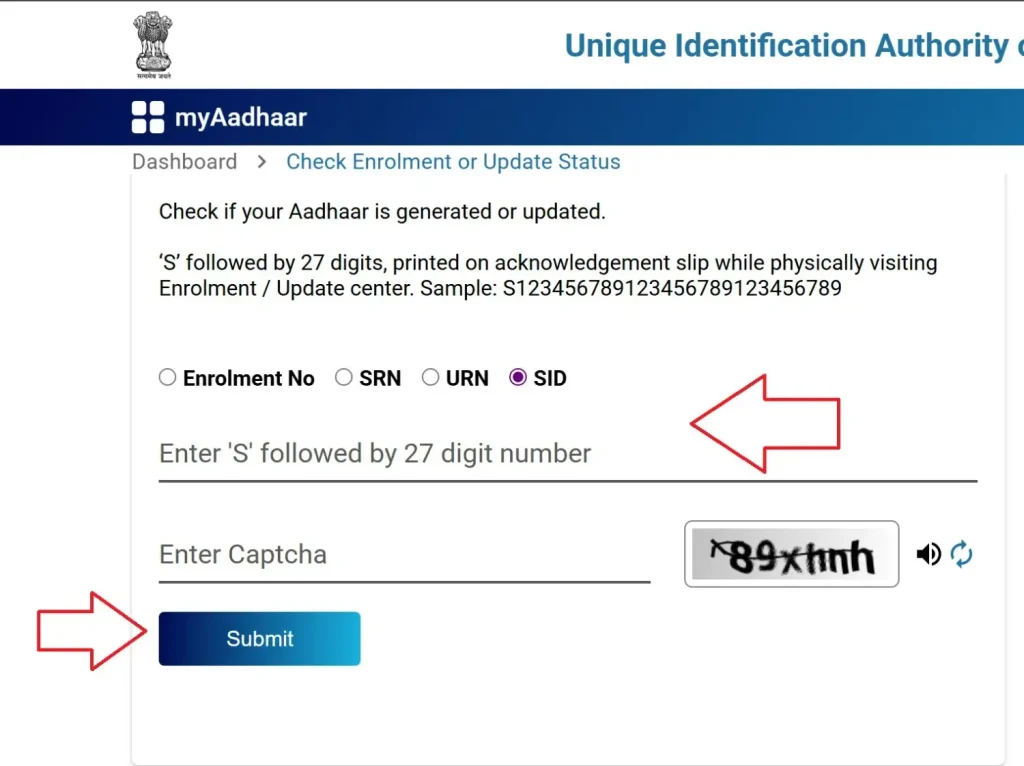
- Visit https://myaadhaar.uidai.gov.in and select Check Enrolment or Update Status.
- Enter your Enrolment No, SRN, URN, SID, and captcha code.
- Receive updates on processing, which usually takes 10–30 days.
Download e-Aadhaar
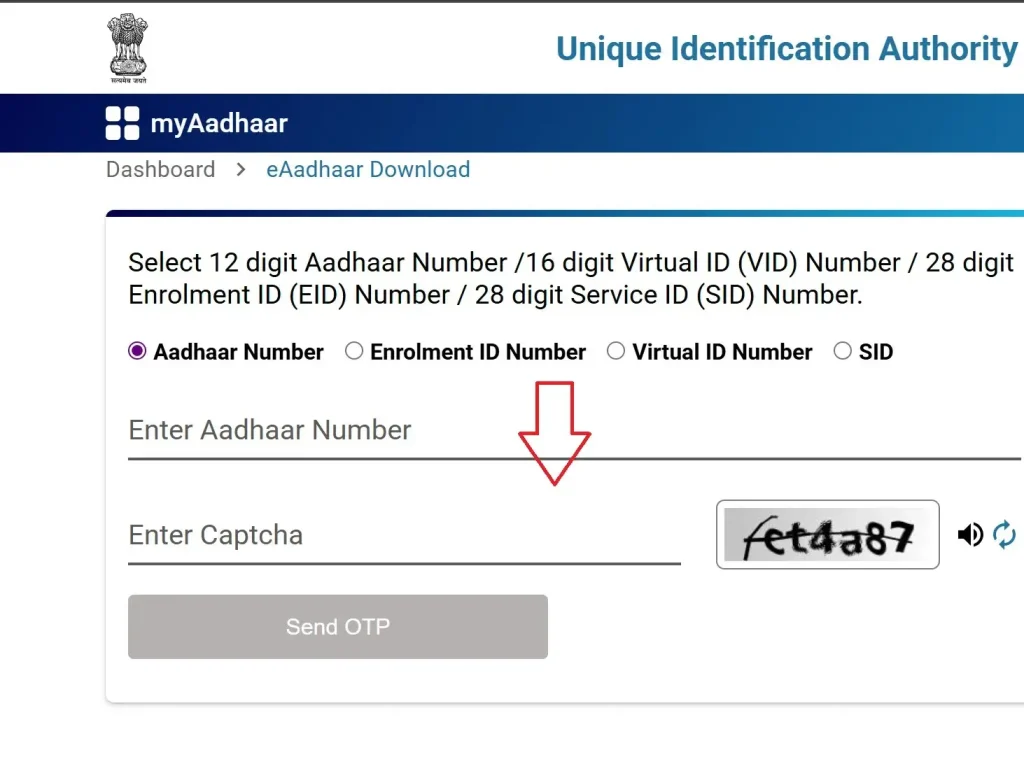
- Once generated, download the e-Aadhaar PDF from myAadhaar portal using your EID or Aadhaar number and OTP.
- Use the password formed from the first four letters of your name (uppercase) plus your birth year.
Order PVC Card
- Request a durable Aadhaar PVC card via https://myaadhaar.uidai.gov.in/genricPVC/en for Rs. 50.
- Delivery typically takes about 5 working days.
Update Details (If Needed)
- Update your address, mobile number, or other details free of cost until 14 June 2026 via https://myaadhaar.uidai.gov.in/du/en_IN.
- Biometric updates or changes at ASKs/PECs may cost Rs. 50–100.
Processing and Verification Timeline
- Children (0–18 years): Aadhaar is usually processed in up to 30 days.
- Adults (18+ years): Processing may take up to 180 days.
- Quality assurance: UIDAI maintains 90% service delivery standards.
- The verification process may include additional checks by state authorities.
Monitor and Access Aadhaar
- Use your 14-digit EID to monitor progress online.
- Once complete, download your digital Aadhaar from the official UIDAI website.
- Keep track of your Aadhaar status and updates for smooth access to services.
Important Tips, Security Measures, Guidelines, and User Support Information
Ensuring your Aadhaar enrolment is safe and smooth is very important. Following the right tips and security measures can protect your data and make the process easy.
Important Guidelines
- Only submit original documents. So, photocopies, scanned copies, or mobile photos are not accepted.
- One-time enrolment is allowed. The multiple enrolments are illegal and will be rejected.
- Your physical presence is mandatory. Online or postal enrolment is not available due to biometric requirements.
- No proxy enrolment: Do not send anyone on your behalf.
- Voluntary service: Aadhaar enrolment is free and not mandatory.
- Always keep your acknowledgment slip safe for 180 days to track the status.
Data Capture and Security
- Provide demographic data like name, date of birth, gender, address, mobile number, and email.
- Biometric data includes a facial photograph. All 10 fingerprints and iris scans.
- For children under 5, only the photograph is captured.
- All data is encrypted and stored in secure UIDAI servers.
- Use supporting documents for digital scanning and storage to avoid mistakes.
Common Mistakes to Avoid
- Provide correct information: form details must match your documents exactly.
- Ensure good quality biometrics: clean hands, clear fingers for better fingerprint capture.
- Avoid document mismatch: verify consistency across all submitted documents.
- Provide a complete address with the correct PIN code.
- Double check your mobile number for SMS updates.
- Do not leave the centre without verifying your acknowledgement slip.
Getting Help and Support
- Call the UIDAI Helpline 1947 for enrolment and update queries.
- Email [email protected] for technical issues.
- Visit regional UIDAI offices for complex issues.
- Use the official UIDAI portal for self-service options.
- Follow official UIDAI social media like Twitter and Facebook for updates.
Security Tips
- Protect your data: Do not share biometrics, OTPs, or Aadhaar numbers publicly.
- Use masked Aadhaar showing only the last four digits when sharing digitally.
- Verify details on your acknowledgement slip before leaving the centre.
- Contact 1947 or [email protected] for assistance in multiple languages: Hindi, English, Tamil, Telugu, etc.
Aadhaar Enrolment Fee Structure
Understanding the Aadhaar fee structure helps you plan for enrolment and updates. UIDAI has made the charges simple and transparent for all residents.
Enrolment and Update Fees
- First-time enrolment for all ages is completely free for Indian residents.
- Child enrolment at any age is free without exception.
- Demographic data updates cost ₹50 per field, including GST.
- Download and print at centers costs ₹30 per copy.
- Online e-Aadhaar download is free via the UIDAI website.
- PVC Aadhaar card issuance costs ₹50, including GST and delivery charges.
Security Tips
Aadhaar Enrolment Centers
Finding a nearby Aadhaar enrolment center is easy with the official tools. Knowing the types of centers helps you choose the right one.
Visit UIDAI Center Locator
- Use the official UIDAI portal to locate authorized enrolment centers near your location.
- The portal provides real-time information about center availability and services.
Understand Center Types
- All enrolment including 18+ and update: Full-service centers for all age groups.
- All enrolment excluding 18+ and update: Centers for children and updates only.
- Only child enrolment and mobile update: Specialized for children under 18.
- Only child enrolment: Exclusive child enrolment services.
Book Appointment (Recommended)
- Walk-ins are accepted. But booking an appointment reduces waiting time.
- Some centers allow online appointment booking via the UIDAI portal.
FAQ – Simple Answers About Aadhaar Enrolment
Yes. New Aadhaar enrolment is free, which means it is completely free. UIDAI takes no fee for first-time Aadhaar registration. Many people worry about money, but there is no cost at all.
No. Online enrolment is not fully possible. Only appointment booking works online. After that, a visit to the Aadhaar Enrolment Centre is needed to submit documents and give biometric details like fingerprints and iris scan.
For new Aadhaar registration, some documents are checked. These help confirm identity. This step keeps Aadhaar enrolment safe and correct.
A child’s Aadhaar card cannot be fully online. For Baal Aadhaar registration, go to the centre with a birth certificate and one parent’s Aadhaar. The child must be present.
Yes. Mobile number linking is allowed. Visit Aadhaar Seva Kendra for mobile number link or mobile number update. The number is needed for OTP and other Aadhaar services like download, update, and verification.
Aadhaar generation time is usually 5 to 15 working days after successful enrolment. Once ready, Aadhaar generated status appears online.
To see Aadhaar card enrolment status, track the status online on the UIDAI website. Use Enrollment ID or EID. Enter the date and time from the acknowledgement slip. The screen shows a generated or under-processing status.